

Parcel Mode User Guide
Overview
Algorithm Version: A.2
This guide provides additional details about the parcelMode parameter, which allows you to specify how roof and building features are managed when the feature extends across adjacent parcels.
By default, the AI Feature API treats input AOIs supplied as a polygon or an address, as a search area of interest, returning all features found intersecting the AOI. However, often there will be some detections that intersect the AOI that are not relevant to the query such as a neighboring parcel's building or detections with low confidence. To make results more relevant to the query, additional filtering logic specified using the parcelMode boolean query parameter, can be applied to the intersecting detections. This applies only when the confidence and fidelity of the detection is high enough to make a confident determination.
Parcel mode enables you to:
- Fetch the features relevant to a single parcel, filtering out features that may intersect the parcel but belong to another parcel
- Analyze large, connected structures such as row-homes that may belong to multiple parcels
- Analyze inclusion of structures that sit alongside, or straddle a property boundary
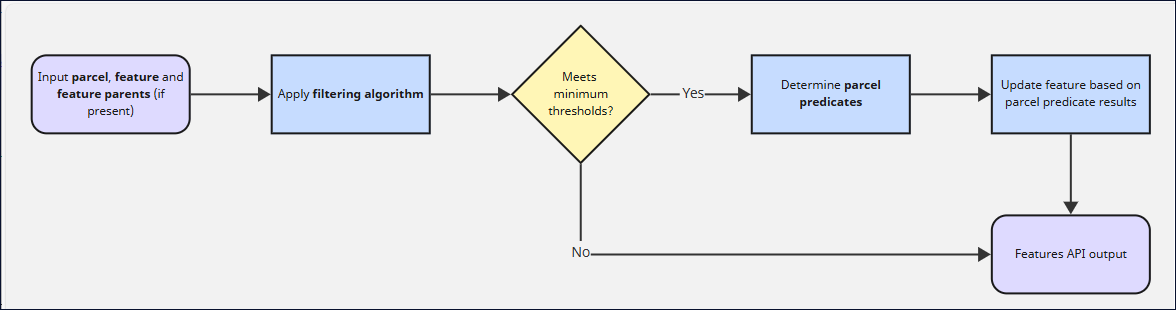
This document details the two algorithms used by parcel mode, the Filtering algorithm and the Parcel Predicates algorithm, to determine the spatial relationships between parcels and features, and how this affects feature output.
Using Parcel Mode
When making a request to the AI Feature API, the optional Boolean query parameter parcelMode that is set to false. When set to true. parcel mode is enabled. When you do this, the features are "clipped" to the parcel boundary and bits that extend to adjacent parcels are omitted for the purpose of calculations.
Note: The parcelModeparameter is applicable only for Gen6 resources.
Example AI Feature API request URL with parcelMode=true:
https://api.nearmap.com/ai/features/v4/features.json?polygon=138.63509265156915%2C-34.7719689197455%2C138.63524497475277%2C-34.772255216674026%2C138.63551476751462%2C-34.77196043685898%2C138.63509265156915%2C-34.7719689197455&packs=damage_non_postcat&systemVersionPrefix=gen6&since=2025-01-01&until=2025-01-25&parcelMode=true
Filtering algorithm
The Filtering algorithm is applied first to exclude any feature detections that lack the confidence and fidelity levels to make a confident and useful determination of parcel inclusion. It accepts two inputs:
- The feature under analysis
- The filtering algorithm result of the feature's parents (if the feature has a parent)
The filtering algorithm is configured with minimum confidence and fidelity thresholds per feature class, allowing different quality standards for different types of features (buildings, pools, etc.). Note that fidelity thresholds are optional and may not be set for all feature classes.
Workflow
- Parent inheritance: If a feature has a parent, it inherits the parent's filter decision (keep/discard).
- Threshold checks: For features without parents, two thresholds are evaluated:
- Minimum confidence: Feature confidence must meet or exceed the configured threshold
- Minimum fidelity (optional): If a minimum fidelity threshold is configured, feature fidelity must meet or exceed the threshold
Result: Features that pass both checks are retained for parcel predicate processing. Features that fail are excluded and will not be assessed by the Parcel Predicates algorithm.
Parcel Predicates algorithm
The Parcel Predicates algorithm determines the spatial relationships between the input parcel and building/object features that intersect that parcel. It accepts three key inputs:
- The parcel boundary
- The feature under analysis
- The parcel predicate results for this feature's parent (if this feature has a parent)
The parcel predicates algorithm then determines and returns the two kinds of relationships/predicates:
- Belongs to parcel (
belongsToParcel) - whether the feature belongs to the parcel - Should clip (
shouldClip) - whether the feature should be clipped by the parcel
Workflows
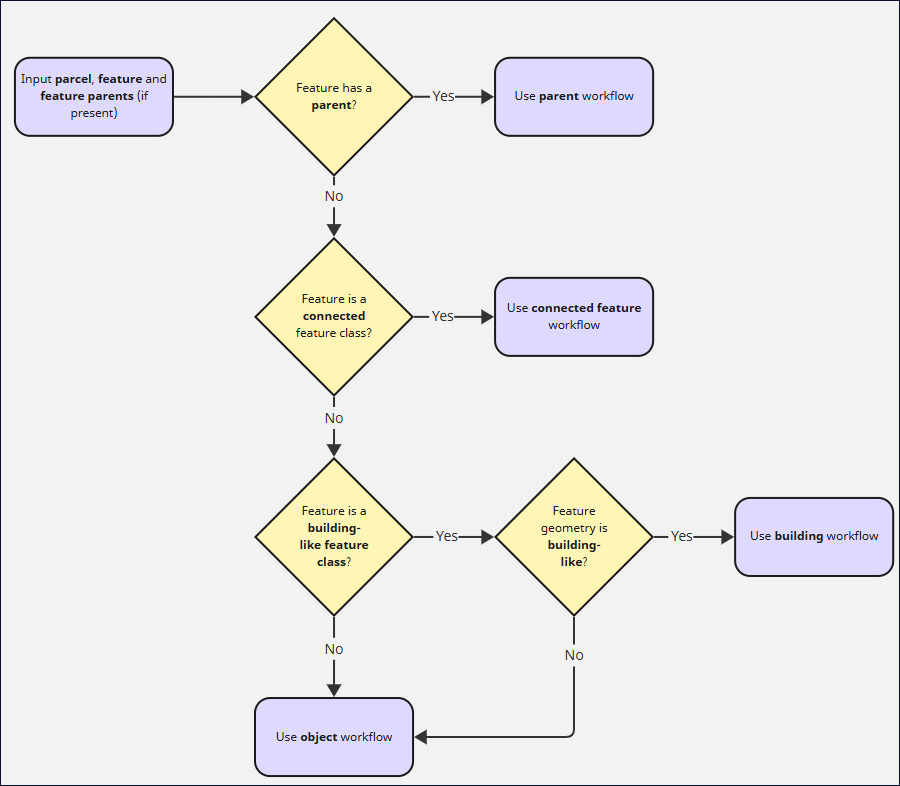
The algorithm applies one of four workflows depending on characteristics of the input. It first determines which workflow is appropriate, in order of precedence:
- Parent workflow: if the feature has a parent, this workflow is initiated. Otherwise, the algorithm continues to the next workflow.
- Connected feature workflow: if the feature is a connected feature class, this workflow is initiated. Otherwise, the algorithm continues to the next workflow.
- Object workflow or building workflow: If the feature does not have a parent and is not a connected feature class, the algorithm initiates the object workflow or building workflow. The algorithm differentiates between features that are building-like, and non-building-like ('objects' as opposed to 'buildings'), and will make a determination on which category is suitable based on the feature class and the geometry.
Parent workflow
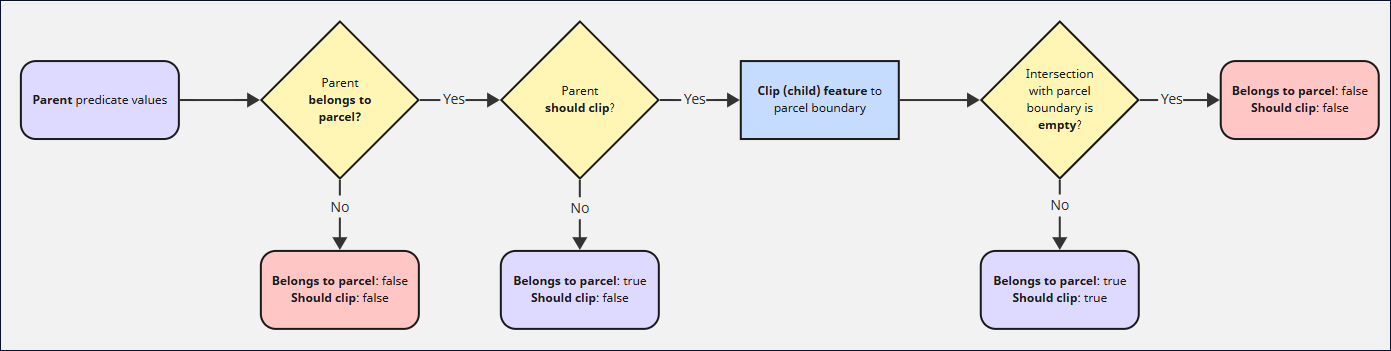
When a feature has a parent feature (like a child structure on a building), the child inherits the predicate values based on the values of its parent.
-
If parent doesn't belong (
belongsToParcel: false):- Result:
belongsToParcel: false,shouldClip: false - The child automatically doesn't belong either
- Result:
-
If parent belongs but shouldn't clip (
belongsToParcel: true,shouldClip: false):- Result:
belongsToParcel: true,shouldClip: false - The child belongs and is not clipped
- Result:
-
If parent belongs and should clip (
belongsToParcel: true,shouldClip: true):- Child is intersected with the parcel boundary
- If intersection is empty:
belongsToParcel: false,shouldClip: true - If intersection has area:
belongsToParcel: true,shouldClip: true
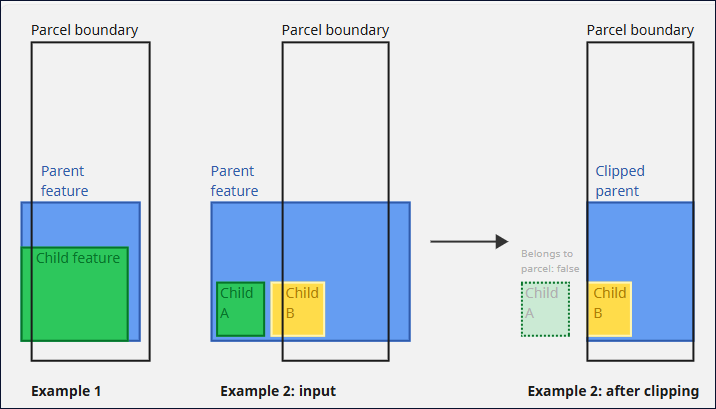
Examples:
-
A section of roof on a building that overlaps the parcel boundary but whose parent building is not assessed as should clip will not be clipped (see Example 1)
-
A solar panel on a building that crosses a parcel boundary inherits the building's clipping behavior (see Example 2)
- If the clipped area of the solar panel is nil, the solar panel will be marked as not belonging to the parcel (see Example 2, child A)
- If the clipped area of the solar panel is not nil, the solar panel will be marked as belonging to the parcel (see Example 2, child B)
Connected feature workflow
For features classified as "connected" (such as asphalt), the logic is simple. It's always: belongsToParcel: true
Connected features by nature span multiple parcels. They "belong" to all parcels they touch. All connected classes are automatically clipped to the input parcel boundary or AOI (even when parcel mode is not used).
Example: An asphalt road passing through a parcel belongs to that parcel and is always clipped to the parcel boundary.
Object workflow or building workflow
If the feature has no parent predicates and is not connected, the spatial relationship of the feature and parcel will be assessed to make a determination of whether it belongs to the parcel, and whether it should be clipped. There are two key paths:
- The building workflow (for building-like features)
- The object workflow (for non-building-like features)
If the feature is assessed as being building-like, the building workflow is used, otherwise the object workflow is used. A feature is sorted into one of these categories using its feature class ID and by assessing its geometry as a part of the building-like geometry test. A feature is considered building-like if (all must be true for a feature to be considered building-like):
- Is building-like feature class: the feature class of the feature under analysis is considered building-like. These include classes such as roof, greenhouse, building and other similar building-related classes.
- Geometry is building-like: the geometry of the feature is building-like. This is decided using the building-like geometry test below. This is to filter out feature detections that may be of the correct class, but whose geometries do not appear building-like.
Building-like geometry test
A building-like geometry check is applied to a geometry to determine whether the geometry (and hence feature) is building-like. This is used as a part of the separation of buildings and objects (see above), and as a part of the building workflow itself. There are two checks (all must be true for a geometry to be considered building-like):
- Not too small: Area ≥ 30 m²
- Not too narrow: After eroding the geometry by 0.5m, the minimum width of the geometry is ≥ 2.0m. This filters out slivers and edges that may have an area above 30m² but are not building-like. The erosion is used to deal with thin protrusions that may affect the assessed minimum width.
If the geometry does not meet both the building-like criteria, it is assessed as not being building-like.
Object workflow
The object workflow applies to non-building-like features with no parents. This includes features of a feature class that aren't considered building-like (for example, anything from trees to debris to swimming pools), or features of a building-like feature class whose geometries are not building-like according to the building-like geometry test.
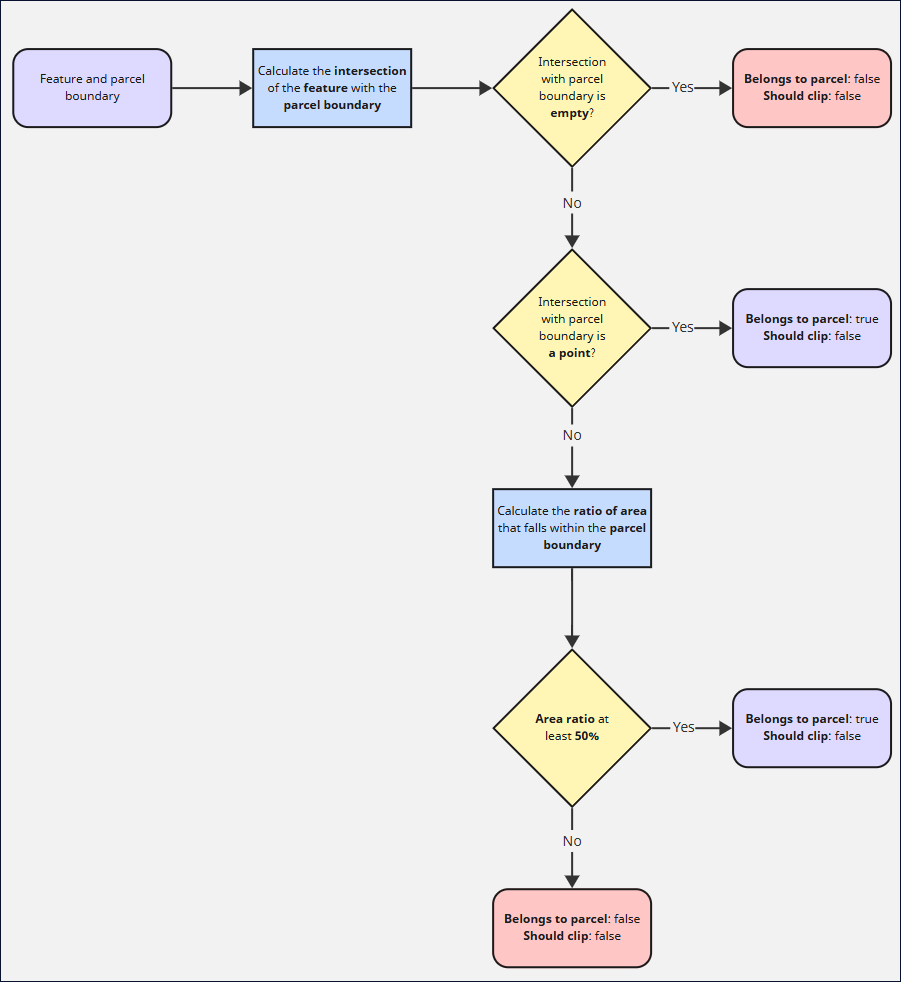
The object workflow looks at the spatial relationship of the feature with the parcel boundary, in particular whether at least half of the feature falls within the parcel boundary. Clipping is not applied to non-building-like objects in this workflow.
- Calculate the intersection of the feature with the parcel
- If intersection is empty:
- Result:
belongsToParcel: false,shouldClip: false
- Result:
- If the feature is a point:
- Result:
belongsToParcel: true,shouldClip: false - Points inside parcels always belong, as their area is zero.
- Result:
- Otherwise, calculate the area ratio using:
area_ratio = (area inside parcel) / (total feature area)- If
area_ratio >= 0.5(50%):- Result:
belongsToParcel: true,shouldClip: false
- Result:
- If
area_ratio < 0.5:- Result:
belongsToParcel: false,shouldClip: false
- Result:
- If
Objects in the object workflow are never clipped (shouldClip is always false). Either the entire object belongs to the parcel or it doesn't.
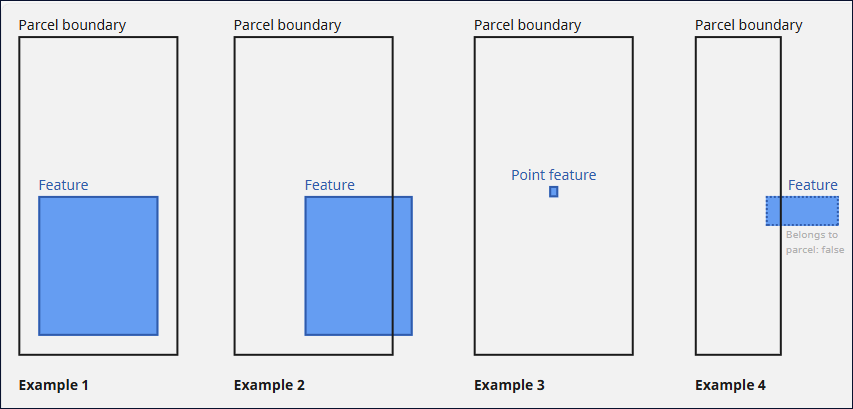
Examples:
- A pool entirely within a parcel belongs to that parcel (see Example 1)
- A tree that is mostly (>=50%) within a parcel belongs to that parcel (see Example 2)
- An object that is a point feature (such as a pole) that falls within a parcel belongs to that parcel (see Example 3)
- A building feature that is smaller than 30sqm that mostly falls outside of a parcel does not belong to that parcel (see Example 4)
Building workflow
The Building workflow applies to building-like features with no parents. These are features that are both of a building-like feature class, and which pass the building-like geometry test (see 'Building-like geometry test' above). Building-like features can be assigned the 'should clip' property if they are multi-parcel buildings, such as attached townhouses that belong to multiple parcels. In order to determine whether a building is single-parcel or multi-parcel, the algorithm analyses the relationship of the building to the parcel, and whether the parts of the building outside of the parcel can be considered to be buildings in their own right (so as to determine whether they are overhanging the parcel boundary, or legitimate multi-parcel structures).
First, calculate three key properties of the spatial relationship between the building and parcel geometries.
The three properties are:
- Whether the parcel is building-like:
parcelIsBuildinglike - Whether the intersection is building-like:
intersectionIsBuildinglike - Whether the difference is building-like:
differenceIsBuildinglike
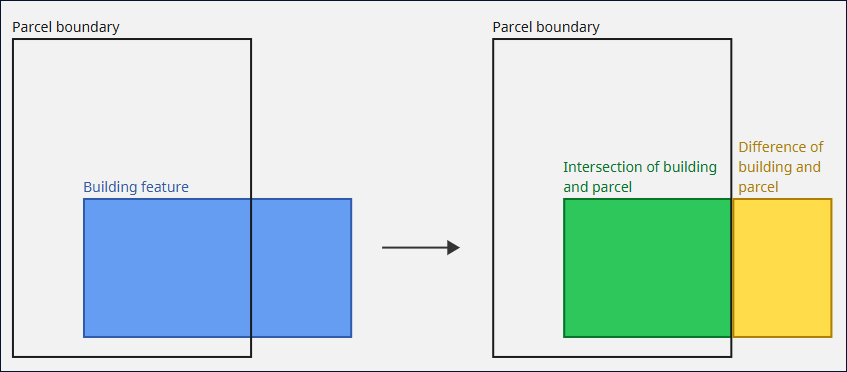
- Apply the building-like geometry test to the parcel: this determines the property
parcelIsBuildinglike - Calculate the intersection of the building and parcel
- Apply the building-like geometry test to the intersection of the building and parcel: this determines the property
intersectionIsBuildinglike - Calculate the geometric difference between the building and parcel (that is, the portion of the building geometry that falls outside the parcel)
- Apply the building-like geometry test to the geometric difference between the building and parcel (see Point 4 above): this determines the property
differenceIsBuildinglike
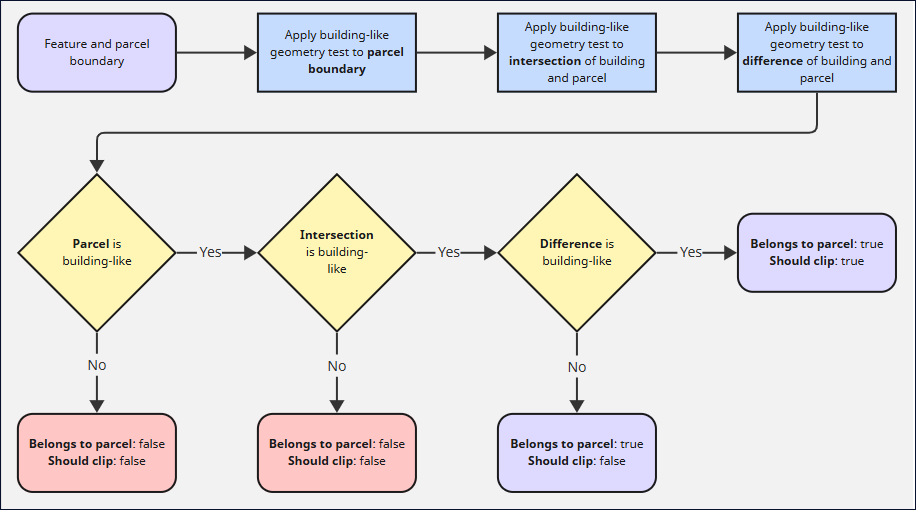
Then, based on these three properties, the belongsToParcel and shouldClip predicates can be calculated:
belongsToParcel: whereparcelIsBuildinglikeandintersectionIsBuildinglikeare both true.shouldClip: whereparcelIsBuildinglike,intersectionIsBuildinglikeanddifferenceIsBuildinglikeare all true.
Examples:
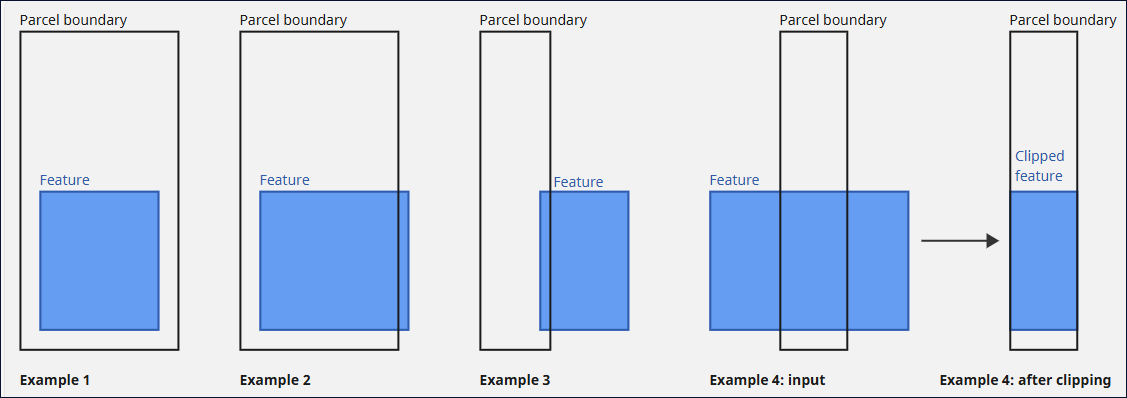
- A building entirely contained within a parcel belongs to that parcel and does not need to be clipped (see Example 1)
- A building mostly within a parcel that slightly overhangs the boundary (such that the overhang is not large enough to be building-like in its own right) belongs to that parcel and does not need to be clipped (see Example 2)
- A building mostly outside of the parcel that slightly overhangs the boundary (such that the overhang is not large enough to be building-like in its own right) does not belong to that parcel and does not need to be clipped (see Example 3)
- A building that intersects the parcel and is building-like within, and outside the parcel belongs to that parcel and should be clipped (see Example 4)
Interpretation
-
Both inside and outside building-like (
belongsToParcel: true,shouldClip: true):- Multi-parcel building crossing a parcel boundary
- Both inside and outside portions are building-like. The building is considered to belong to multiple parcels.
- Result: The building is a multi-parcel building that belongs to multiple parcels. Use the clipped geometry for the portion that is relevant to this parcel.
-
Inside building-like, outside not (
belongsToParcel: true,shouldClip: false):- Single-parcel building belonging to this parcel only
- The portion inside the parcel is substantial and building-like
- If there is any portion that lies outside the parcel, it is too small/narrow to be building-like. This can occur when a single-parcel building slightly overhangs the edge of a parcel. The overhanging section is determined not to be a building in its own right.
- Result: The building is a single-parcel building thus the entire building belongs to this parcel, clipping is not required.
-
Inside not building-like (
belongsToParcel: false,shouldClip: false):- The portion inside the parcel is too small/narrow and not considered to be building-like.
- Result: Building doesn't belong to this parcel.
Belongs to parcel
The belongs to parcel predicate indicates whether a feature is likely to belong to the input parcel. A feature that is assessed as belongs to parcel with the value true will be marked with the property belongsToParcel: true in the feature output.
- true: The feature belongs to the parcel and is relevant to analysis of features on this parcel
- false: The feature does not belong to the parcel and should be excluded from analysis
Examples
Examples of belongs to parcel predicate:
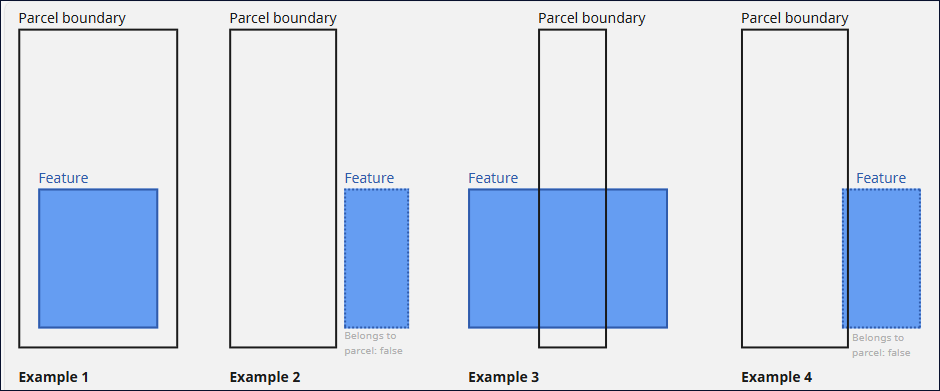
- A building wholly within a parcel is considered to belong to the parcel (see Example 1)
- A building that does not intersect with the parcel is not considered to belong to the parcel (see Example 2)
- A large, multi-parcel building with a large overlap with the parcel is also considered to belong to the parcel (see Example 3)
- A building that partly intersects with a parcel but sits almost entirely outside. This could be a neighboring building that slightly overhangs the parcel boundary, for example. This is not considered to belong to the parcel. (see Example 4)
These are the most obvious cases, the algorithm has additional logic to deal with other edge cases which will be explained in the Algorithm section below.
Clipping
The should clip predicate indicates whether a feature should be clipped to the parcel boundary. This is to handle large, multi-parcel buildings such as a series of attached dwellings - where only the portion overlapping the parcel boundary is relevant. By contrast, a building almost entirely contained within the parcel but with a slight overlap should not be clipped.
- true: The feature geometry should be clipped. The
clippedGeometryfield will be populated with the geometry clipped to the parcel boundary - false: The feature geometry should be used as-is, without clipping
should clip can only be true when belongs to parcel is also true. If a feature doesn't belong to a parcel, it will never be clipped.
The should clip predicate determines whether a clipped feature geometry (field name clippedGeometry) will be included in the response. A clipped geometry will only be included if the should clip predicate is true. No explicit shouldClip flag is output as a part of the API response.
Examples
Examples of the uses of the should clip predicate:
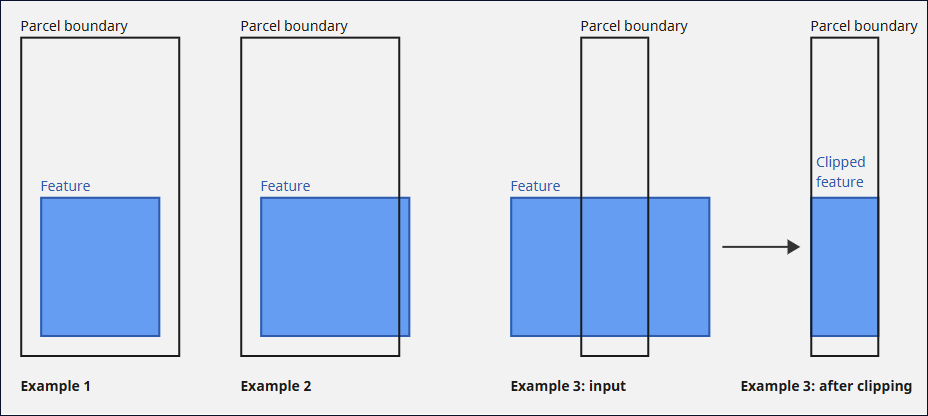
- A building entirely contained within a parcel should not be clipped (see Example 1)
- A building slightly overhanging the parcel should not be clipped (see Example 2)
- A large multi-parcel building (such as a series of row homes) should be clipped (see Example 3)
As with belongs to parcel, the complexities and edge cases of should clip will be explored further in the Algorithm section below.
Features API output
Once parcel mode has been run for a feature, the algorithm results will be used to update the feature in the Features API response.
Filtering algorithm result
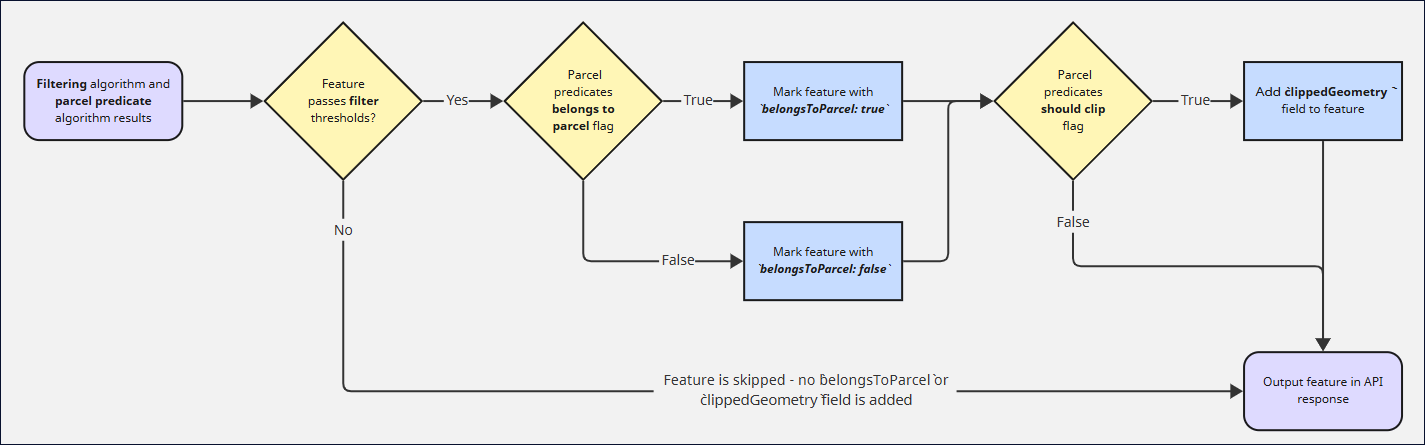
If the filtering algorithm determines the feature to have a confidence and/or fidelity (if configured for this feature class) that falls below the minimum threshold, the feature will be skipped and the parcel predicate algorithm will not run. The feature will not be assigned a belongsToParcel flag.
Parcel predicates result
If not excluded by the filtering algorithm, the results of the parcel predicates algorithm will be used to update the feature in the Features API response.
There are two fields that may be added:
belongsToParcel: this boolean value is always added to the feature if the feature passes the filter thresholds (as a part of the filtering algorithm process).clippedGeometry: this geometry field is added only if the feature has been clipped. All features belonging to a connected class are populated with a clipped geometry, and where the should clip predicate is true.
Example feature payload with parcel mode active. Note that the geometry and clippedGeometry fields have been abbreviated for brevity:
{
    "id": "a625b32f-6fd8-53b8-b577-7ac5a5da040f",
    "classId": "91987430-6739-5e16-b92f-b830dd7d52a6",
    "internalClassId": 1099,
    "description": "Building lifecycle",
    "confidence": 0.9980469,
    "parentId": "",
    "geometry": {
        "type": "Polygon",
        "coordinates": [...]
    },
    "clippedGeometry": {     // `clippedGeometry` field added by parcel mode when it is determined that the feature should be clipped
        "type": "Polygon",
        "coordinates": [...]
    },
    "areaSqm": 236,
    "areaSqft": 2540,
    "clippedAreaSqm": 222.7,
    "clippedAreaSqft": 2397,
    "unclippedAreaSqm": 236,
    "unclippedAreaSqft": 2540,
    "attributes": [],
    "surveyDate": "2025-01-11",
    "meshDate": "",
    "isFootprint": false,
    "belongsToParcel": true  // `belongsToParcel` flag added by parcel mode
}
Updated 8 months ago